How Do I Activate My Account?(Tenant/Buyer Activation)

  • When an account is created for you: You will receive an email from Wavity with the subject line “ Wavity (Company Name) Buyer Activation!
  • Please follow the link in the email to activate your account.
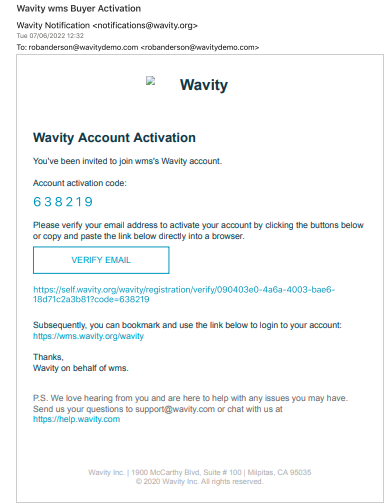
  • Enter the Activation code as shown in below image.
  • Set up your Password.
  • Confirmation message will be displayed as shown below. You can now Sign In to Wavity platform with your email id and password using the tenant URL.

How Do I Activate My Account?(Tenant/Buyer Activation)

  • When an account is created for you: You will receive an email from Wavity with the subject line “ Wavity (Company Name) Buyer Activation!
  • Please follow the link in the email to activate your account.
  • Enter the Activation code as shown in below image.
  • Set up your Password.
  • Confirmation message will be displayed as shown below. You can now Sign In to Wavity platform with your email id and password using the tenant URL.

Leave you comment...

Thank you! Your submission has been received!
Oops! Something went wrong while submitting the form.