Configuring Ticketing General Settings
  • Ticketing General Settings section allows you to map Wavity application and configure advanced features such as Shifts, SLAs, Signatures, Live Chat, Macros, and the AI Chatbot.
  • To begin, click on the profile icon, navigate to Platform Settings, and select General.
  • In Ticketing Tab, Select the General.
  • In the Ticketing Service, select the application which will mapped to configure macros, shifts, live chat, and other features.
  • After selecting the application, you need to map it to the appropriate fields.
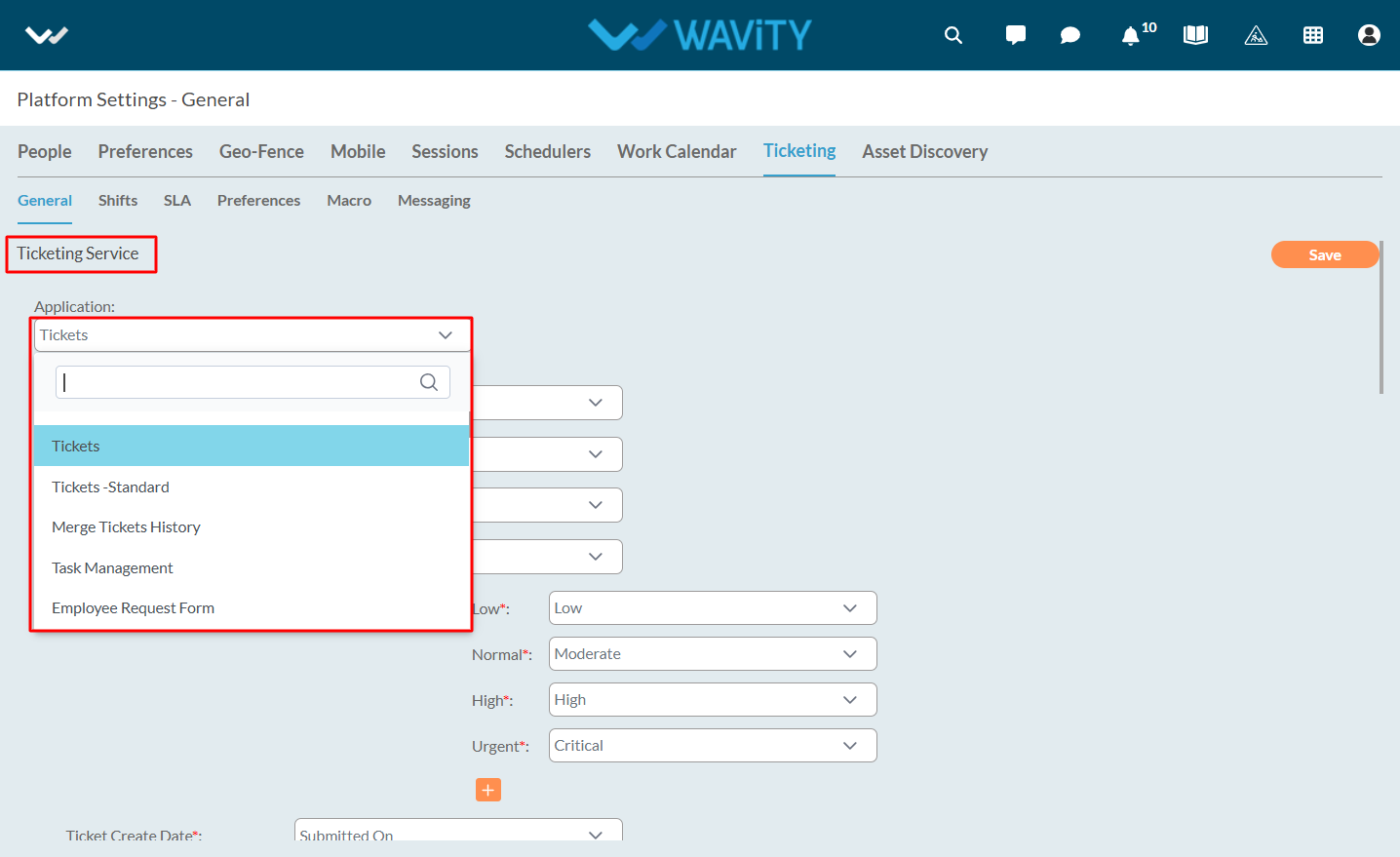
  • After mapping the fields appropriately, click the Save button to apply the changes.

Configuring Ticketing General Settings
  • Ticketing General Settings section allows you to map Wavity application and configure advanced features such as Shifts, SLAs, Signatures, Live Chat, Macros, and the AI Chatbot.
  • To begin, click on the profile icon, navigate to Platform Settings, and select General.
  • In Ticketing Tab, Select the General.
  • In the Ticketing Service, select the application which will mapped to configure macros, shifts, live chat, and other features.
  • After selecting the application, you need to map it to the appropriate fields.
  • After mapping the fields appropriately, click the Save button to apply the changes.

Leave you comment...

Thank you! Your submission has been received!
Oops! Something went wrong while submitting the form.
