How To Enable Two-Factor Authentication?

  • Two-factor authentication (2FA) is a security measure that requires users to provide two forms of identification to access a system or application. This approach adds an extra layer of security beyond just a traditional username and password login.
  • Note: Only Admin/Solution Owner can enable Two-factor authentication.
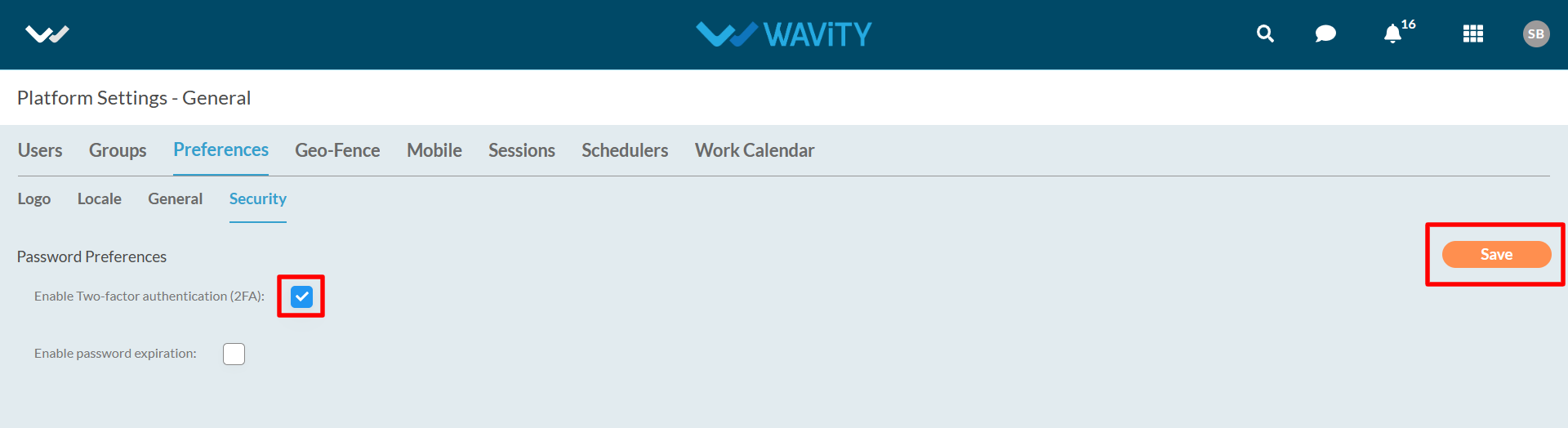
  • To enable two-factor authentication, click on Profile Icon > Platform Settings – General > Preferences > Security.
  • Check the box and click on save.
  • Upon activation of two-factor authentication, System will send auto generated code to email or mobile during login and along with password. User should enter the received code.

How To Enable Two-Factor Authentication?

  • Two-factor authentication (2FA) is a security measure that requires users to provide two forms of identification to access a system or application. This approach adds an extra layer of security beyond just a traditional username and password login.
  • Note: Only Admin/Solution Owner can enable Two-factor authentication.
  • To enable two-factor authentication, click on Profile Icon > Platform Settings – General > Preferences > Security.
  • Check the box and click on save.
  • Upon activation of two-factor authentication, System will send auto generated code to email or mobile during login and along with password. User should enter the received code.

Leave you comment...

Thank you! Your submission has been received!
Oops! Something went wrong while submitting the form.