Portfolio Manager Guide: Approving a Pending Project
Portfolio Manager Guide: Approving a Pending Project
- In the Wavity Project Portfolio Management Solution, approving a project as a Portfolio Manager is a simple and intuitive process.
- A user with Portfolio Manager access can approve any project that is currently pending.
- Log in using your credentials. Upon logging in, you will land on the Portfolio Manager persona.
- Note: The steps provided serve as sample instructions and can be customized based on specific requirements; however, the core workflow will remain the same.

- In the Pending Final Release Project(s) table widget, you can view all pending projects. Select the project you wish to approve.

- After selecting the project, you can view the complete project details under the Project and PMO Lead tabs.

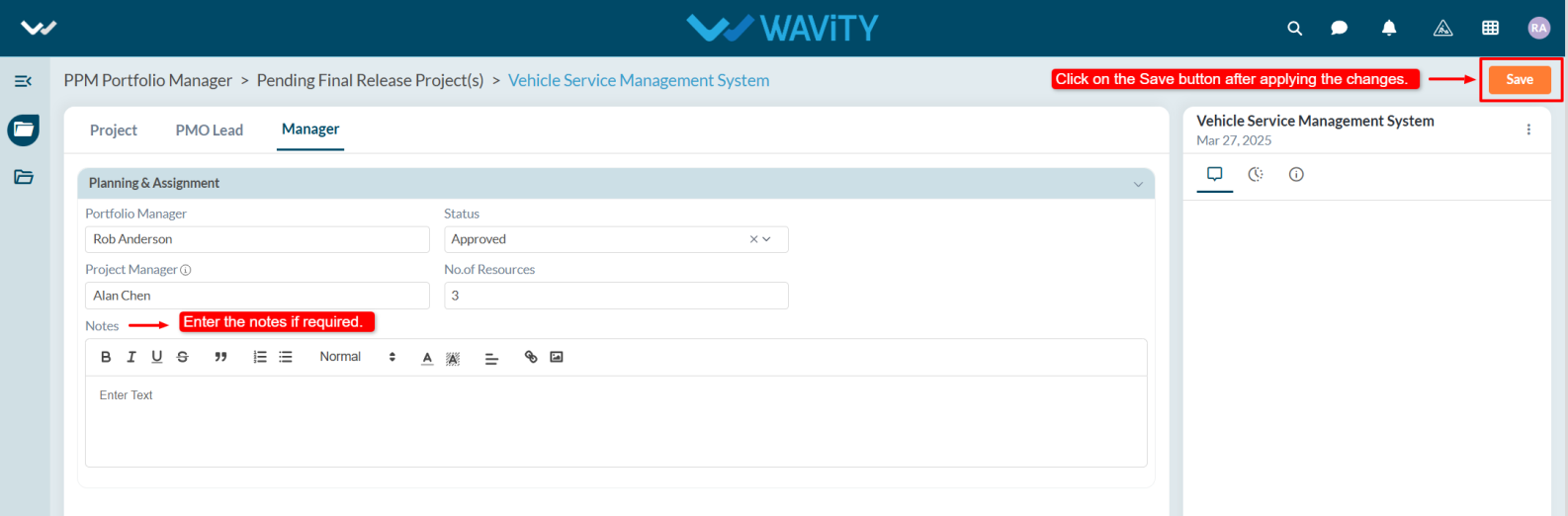
- Navigate to the Manager tab. Under the Planning and Assignment section, select your name in the Portfolio Manager field and update the project status to Approved.

- Assign a Project Manager and specify the number of resources required for the project.

- If necessary, add any relevant notes, then click on the Save button to finalize the approval.